Add Music to Instagram Post: Full Steps 2026 Guide
You can add music to Instagram post by tapping Add Audio during the caption step, picking a song from Instagram's library, and choosing a clip up to 90 seconds long. As of July 2026, you can also swap the music on posts that are already published using Instagram's new Replace Audio feature — no deleting, no lost engagement.
Okay, real talk — now let's actually break this down properly.
I used to post photos on Instagram with zero sound and wonder why nobody stopped scrolling.
Turns out, silence is kind of the enemy of engagement.
The second I started using Instagram's built-in music feature, my posts felt alive. And you're about to learn exactly how to do the same thing — no fluff, no filler, just what actually works right now.
Let's get into it.
Why Adding Music to Your Instagram Post Actually Matters
Music turns a static photo into something people feel, not just see, which is exactly why it drives more stops, more watch time, and more engagement than a silent post ever will.
Here's the thing — Instagram didn't always let you do this. It rolled out music for feed photo posts back in 2022, giving up to 90 seconds of song time to a format that used to be completely mute. Since then, it's quietly become one of the easiest engagement levers you have available — if, and only if, you know how to use it properly.
So let's make sure you do.
The short version
You tap Add Audio, pick a song, choose your favorite 15–90 second clip, and hit share. That's genuinely it. But the details matter, so let's slow down.
How to Add Music to an Instagram Post: Step-by-Step
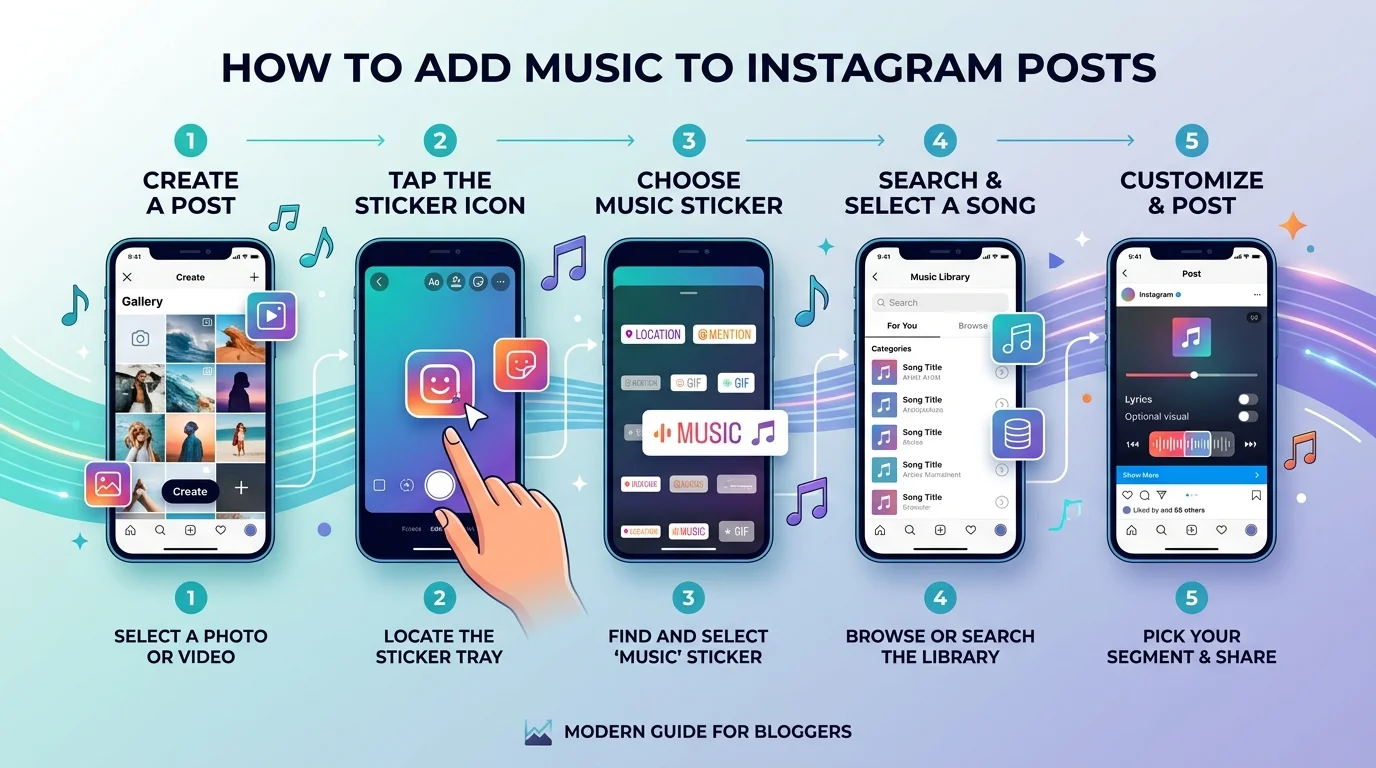
The fastest way to add a song is through the Add Audio button on the caption screen — here's exactly where to find it, in order, so you're not hunting around for a button that moves depending on your app version.
Step 1: Start a new post
Tap the + icon like normal. Choose Post, then select your photo, video, or a batch of images for a carousel.
Step 2: Edit as usual
Apply filters, crop, adjust — nothing changes here.
Step 3: Tap "Add Audio"
On the caption screen, look for Add Audio or a small music-note icon. Hootsuite's walkthrough confirms it usually sits right below the geotag field.
Step 4: Search the music library
Browse trending audio, search by song or artist, or check your saved favorites.
Step 5: Pick your clip
Slide the timeline to choose which section plays, then preview it before locking it in.
Step 6: Share it
Tap Done, finish your caption, and hit Share. Your post now has a soundtrack.
Reels vs. Stories vs. Feed Posts: Which Format Handles Music Best?
Reels give you the deepest music tools, Stories rely on a dedicated music sticker, and feed posts/carousels are the most limited and least predictable — so pick your format based on how much control you actually need.
Knowing the difference upfront saves you a lot of frustrated tapping later, especially if you're expecting the same button to appear every time. Spoiler: it won't.
Format | Music Tool | Max Length | Trending Audio Access | Best For |
|---|---|---|---|---|
Reels | Add Audio + beat-sync | Full song length | ✅ Full priority | Discovery, trends, virality |
Stories | Music sticker | Short clip | ✅ Yes | Quick daily updates |
Feed Post / Photo | Add Audio | Up to 90 seconds | ⚠️ Limited | Static photos, photo dumps |
Carousel | Add Audio (inconsistent) | Up to 90 seconds | ⚠️ Rollout-dependent | Multi-photo storytelling |
Reels give you the widest song library and beat-syncing tools — if music genuinely matters to your content, Reels is the stronger format to lean into.
Stories use the music sticker — tap the sticker icon, select Music, and pick a track complete with lyrics and album art, as covered in Later's guide. And if you're cross-posting that same photo to your Story afterward, it's worth knowing how to repost a Story on Instagram so your music carries over cleanly to both formats.
Carousels remain the least predictable, with support varying by account and region.
Instagram Music Access by Account Type
Your account type — not a bug — is usually the real reason your music options look different from someone else's.
Personal accounts get the broadest access, creator accounts sit in the middle, and business accounts are restricted to a smaller, commercially-safe library. Here's how that breaks down:
Account Type | Music Access | Commercial Use Allowed? | Notes |
|---|---|---|---|
Personal | Full licensed music library | ❌ Not for commercial content | Best for casual, non-business posts |
Creator | Full licensed library + broader trending access | ⚠️ Limited | Middle ground between personal and business |
Business | Meta Sound Collection only | ✅ Yes, royalty-free | Safest for brands, smaller song pool |
If you're running a business account, you don't get Instagram's full licensed catalog. Instead, you're limited to the Meta Sound Collection — a library of over 14,000 royalty-free tracks built specifically for commercial use, which Music Business Worldwide covered in detail when Meta rolled it out to advertisers.
What to Do When the "Add Music" Option Disappears
If Add Audio suddenly won't show up, it's almost always one of four things: your app version, your account type, your region, or a temporary rollout bug — and it's rarely permanent.
This one drives everyone crazy, myself included. You go to add a song, and the button that was there yesterday is just... gone. Before assuming something's broken for good, check these first:
Your app isn't updated
Your account type (business accounts get fewer song options)
Your region (licensing varies by country)
A temporary Instagram rollout bug
Guiding Tech's troubleshooting guide recommends updating first, then reinstalling if the issue persists.
The Licensing Rules Nobody Explains Clearly
Using a popular, copyrighted song on a business account risks muted audio, content removal, or account penalties — which is exactly why Meta built a separate royalty-free option for brands.
Here's where people get burned. Copyright law applies here just like anywhere else, and Instagram enforces it strictly on commercial accounts. SRIPLAW's legal breakdown and Foxi Music's copyright guide both spell out how this plays out in practice.
My honest advice? Switch to a creator account where it makes sense, or lean fully into the Meta Sound Collection instead of gambling with copyrighted hits.
Instagram's Huge 2026 Update: Replace Audio
As of July 21, 2026, you can change the music on a post that's already published — without deleting it or losing a single like.
For years, that wasn't possible. Wanted to swap a song? You had to delete the whole post and start from zero engagement. Not anymore.
Instagram's new Replace Audio feature — confirmed by TechCrunch — lets you open a published feed post or carousel, tap the menu, hit Edit, and swap the track. Your likes, comments, and reach stay exactly where they were.
If you post evergreen content, this genuinely changes how you can maintain it.
Make This Part of Your Routine
Adding music to your Instagram post takes less than 30 seconds once you know where to tap — there's really no reason not to be doing it on every post that could use one.
If you're managing several posts a week, tools like Metricool let you attach trending audio before you even hit schedule. And if you already have a specific track in mind from YouTube, grabbing the clip first with a YouTube Shorts music downloader makes matching audio to your visuals even easier before you upload.
So open the app, pick a song that fits your vibe, and give your next post the soundtrack it deserves.
Frequently Asked Questions
Can I add music to an Instagram post after publishing?
Not directly through the original posting flow but Instagram's new Replace Audio feature (launched July 2026) lets you swap the track on already-published feed posts and carousels without losing your likes or comments.
Why can't I find the Add Music option?
It's usually your app version, account type, or region. Update the app first, then check whether you're on a business account, since access varies by account type.
Can business accounts use any song they want?
No. Business accounts are generally limited to the Meta Sound Collection, a library of royalty-free tracks cleared for commercial use, to avoid copyright issues.
Does adding music actually help engagement?
Yes. Music makes static content more emotionally engaging, which increases the odds people stop scrolling and stay on your post longer.
Is Instagram's music library free to use?
Yes, for personal and creator accounts using it organically. Business accounts should stick to the free Meta Sound Collection to stay commercially safe.