YouTube Download Failure? Fix It Fast (2026 Guide)
A YouTube download failure message shows up right when you need a video the most, whether that's for offline viewing on a flight or saving a clip before it gets taken down. The good news is that almost every case traces back to one of four causes: a weak internet connection strength, a YouTube Premium membership issue, a broken third-party YouTube downloader, or a problem with the video itself. Once you know which bucket your issue falls into, the fix usually takes under five minutes. This guide walks through each cause in plain English, using tools like the YouTube video downloader and other trusted options, so you can stop guessing and start watching. Head to YTClipTune for more free tools once you're back up and running.
Why Does YouTube Download Fail?
A YouTube video download failure rarely comes out of nowhere. It usually falls into one of three buckets: something changed on YouTube's side, something broke in your download tool, or something on your own device is getting in the way. Knowing which bucket your problem lives in saves you a ton of guesswork.
Think of it like a car that won't start. It could be the battery, the fuel, or the ignition switch. You don't fix all three at once. You test one, rule it out, and move to the next. That's exactly how we'll approach a YouTube download failed error here.
YouTube Platform-Side Changes
YouTube updates its systems constantly to block unauthorized downloading. New encryption rolls out without warning, detection systems flag known third-party YouTube downloader tools, and rate limiting kicks in when too many download requests hit the servers at once. A tool that worked perfectly last week can suddenly throw a failed network error today, and it has nothing to do with anything you did.
App/Tool-Side Problems
Download tools break for their own reasons too. Outdated software loses compatibility with YouTube almost overnight. Developers abandon apps without pushing an app update. Popular online video downloader website platforms buckle under heavy traffic during peak hours. Software compatibility issues pile up fast in this space, since YouTube is a moving target.
User-Side & Device Issues
Sometimes the problem sits closer to home. Low storage space quietly blocks the save. A firewall or antivirus software flags the download tool as suspicious, causing malware / antivirus blocking. A shaky Wi-Fi signal interrupts the transfer halfway through. Even a simple thing like a typo in the video link can trigger a download error message that looks scarier than it actually is.
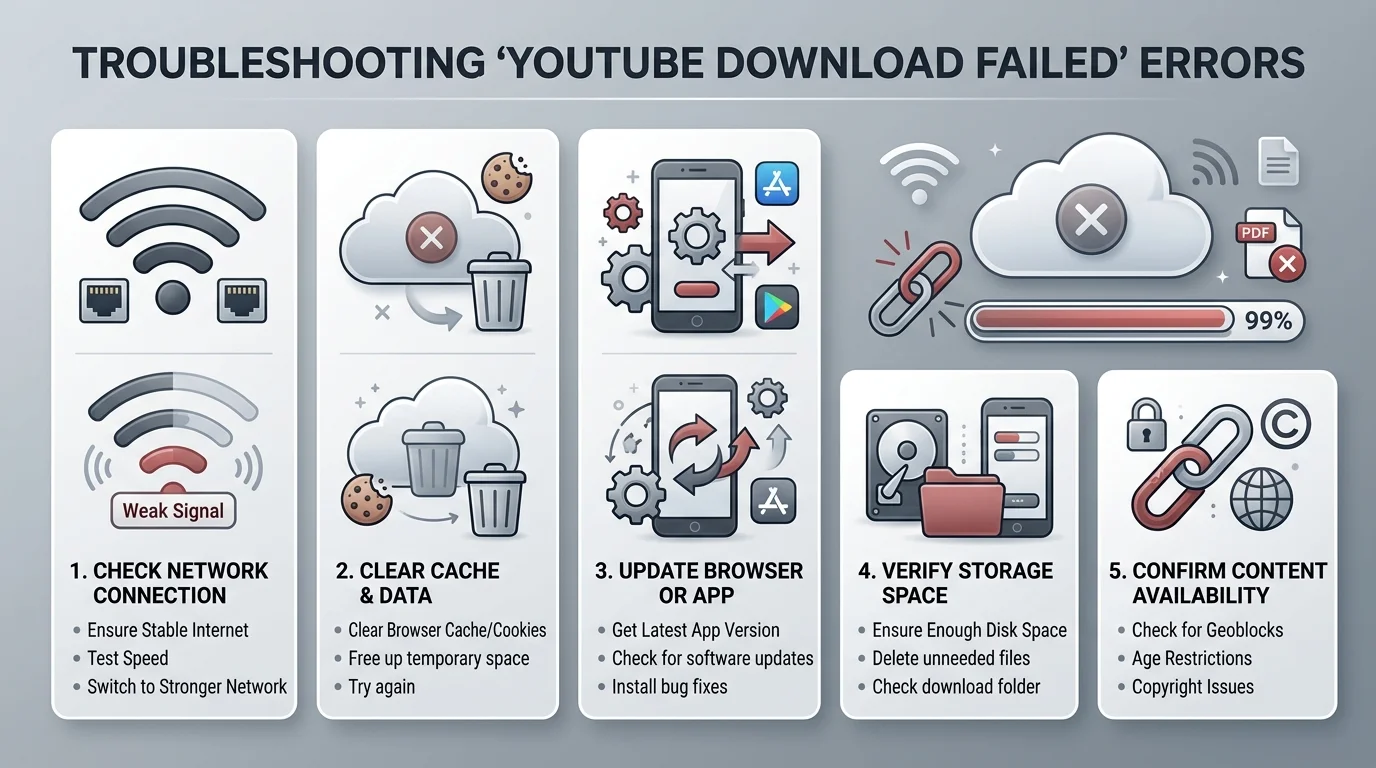
Quick Fixes to Try First (5-Minute Checklist)
Before you go down any rabbit hole, run through this short list. It solves the majority of YouTube download failed cases without any deep troubleshooting.
Step | What to Do | Why It Works |
|---|---|---|
1 | Update your downloader or the YouTube app | Fixes most software compatibility breaks |
2 | Clear browser cache and cookies | Removes corrupted data causing the error |
3 | Confirm the video plays normally on YouTube first | Rules out a video unavailable / private / deleted issue |
4 | Test your internet on a network speed test | Confirms stable internet connection |
5 | Restart your device and try the retry download option | Clears temporary glitches |
If none of these five steps fix it, try a dedicated tool built to save YouTube videos reliably, or keep reading for the specific scenario that matches your error.
Fix "Network Error" When Downloading YouTube Videos
A failed network error is the single most common complaint tied to YouTube download failed searches. It shows up in Chrome, in Firefox, and even inside dedicated apps, and it almost always points back to your connection or your browser setup rather than the video itself.
The frustrating part is that this error rarely explains itself. You just see "Failed - Network Error" and nothing else. Luckily, the fix usually comes down to four checks, and you can run through all of them in under ten minutes.
Check Your Internet Connection Strength
Internet connection strength matters more than most people realize. YouTube recommends at least 3 Mbps for smooth downloads. Anything weaker, especially over a spotty Wi-Fi network connection, tends to cause a stalled download partway through the file.
Disable VPN or Proxy Temporarily
VPN interference is a sneaky cause of download failures. A VPN can make your device look like it's connecting from a region-locked area, which triggers YouTube's location checks. Turning it off temporarily often clears the connection interrupted error instantly.
Clear Browser Cache and Cookies
Old, corrupted cache files confuse your browser mid-download. A full clear browser cache and cookies reset, followed by a test in incognito/private browsing mode with extensions off, rules out almost any leftover data conflict.
Try a Different Browser (Chrome, Brave, Firefox)
If the error follows you across sites, try switching browsers entirely. Brave's built-in Shields feature has been known to misfire and block legitimate downloads, something few guides mention. Switching to Chrome or Firefox temporarily often confirms whether Brave itself is the culprit.
Fix YouTube Premium Download Failures
YouTube Premium membership unlocks offline saving, but that same system has its own list of failure points. If your YouTube Premium download won't work, the cause is almost always tied to your account status rather than the app itself.
Here's a fact worth remembering: your YouTube Premium downloads stop working the moment your subscription lapses, even if the files are still sitting on your phone. That's by design, not a bug.
Sign Out and Re-Sign Into YouTube Premium
Start with a simple sign in / sign out YouTube Premium cycle. Log out of your Google Account, then log back into the exact account tied to your membership. You'll know it worked when you see the YouTube Premium logo, not the standard YouTube icon, in the top corner.
Check Your Membership/Subscription Status
Check your premium subscription status directly in the app. Go to your profile, then Purchases and Memberships, and confirm your membership expiration date hasn't already passed. An expired plan is one of the top causes of a YouTube download failed message for Premium users.
Check Device Download Limit
YouTube Premium enforces a device authorization limit of 10 devices per account. Cross that number, and the oldest device becomes a de-authorized device automatically. You're allowed to do this swap up to four times per year, according to Google's own policy.
Check Mobile Data & Download Settings
Head into Settings, then Library & downloads, then download connection, and make sure "All connection types" is selected. If it's set to Wi-Fi only, high mobile data usage or a data cap will silently block every download attempt.
Fix "Failed to Download" on Desktop Downloader Software
Desktop downloader software fails for reasons that are usually easier to diagnose than mobile or browser issues, since you have full access to the system logs and settings on a computer.
Most desktop downloader software problems trace back to one of two things: the program itself is out of date, or something on your machine, like a firewall, is quietly blocking it from working.
Common Desktop Tool Issues
Outdated software tops the list here. Corrupted installation files, blocked permissions, and a straight-up software compatibility mismatch with your operating system round out the usual suspects behind a stubborn download error message.
Update or Reinstall the Software
A clean fix beats a patch most of the time. Uninstall the program completely, then download a fresh copy from the official source. Reliable tools push regular updates specifically to keep pace with YouTube's changes, so a fresh HD downloader is often the quickest fix.
Temporarily Disable Antivirus/Firewall
Security software sometimes overreacts. Firewall blocking and aggressive malware / antivirus blocking from programs like Avast can stop a safe downloader in its tracks. Disable it briefly to test, then turn it back on right after.
Signs You Need a New Tool
Walk away from a tool if it hasn't shipped an update in six months, if the developer's site has gone dark, or if it keeps failing no matter what you try. At that point, a fresh video converter saves you more time than continued troubleshooting.
Fix Online YouTube Downloader Websites Not Working
An online video downloader website feels convenient because it needs no installation, but this category also fails more often than any other type of tool, and that's not an accident.
Why Online Tools Fail Frequently
These sites depend on shared servers, so heavy traffic causes timeouts fast. Many get shut down for copyright issues and quietly relaunch under new domains. YouTube also actively blacklists known downloader domains, which is why yesterday's working site might be dead today.
Warning Signs of an Unreliable Site
Watch for missing HTTPS in the address bar, a wall of pop-up ads, multiple fake "Download" buttons, or a CAPTCHA wall that never seems to clear. Reddit users have flagged sites like these repeatedly, since they often lead to a 0-byte file or, worse, a hidden malware payload.
Safer Alternatives to Online Downloaders
Desktop software processes files locally instead of routing them through a stranger's server. That one difference alone cuts your exposure to shady ads, fake buttons, and corrupted download file issues by a wide margin. A dedicated 1080p downloader is usually a safer bet than an unknown site.
Fix Browser Extension Download Errors
A browser extension is quick to install and just as quick to break, since it depends entirely on both the browser vendor and YouTube staying compatible with it.
Why Extensions Stop Working
Chrome and Firefox routinely pull YouTube downloader extensions for violating store policy. Add in the fact that browser updates can silently break extension code, and you've got a recipe for frequent failure.
Update or Reinstall the Extension
Check the extension's store page first to confirm it still exists. If it does, reinstall it fresh, clear related browser data, and disable any other extensions that might be causing a conflict.
When to Stop Using Extensions
If an extension keeps failing after every fix, it's time to let it go. Standalone software simply doesn't depend on a browser vendor's approval to keep functioning.
Fix YouTube Download Problems on Mobile (Android & iOS)
Mobile devices bring their own quirks to a YouTube download failed error, and the fix looks different depending on whether you're on Android or iOS.
Android-Specific Fixes
Check that storage permissions are actually granted, since Android blocks silently otherwise. Battery optimization settings can also kill background downloads mid-transfer. Clearing the app's cache and confirming any APK came from a trusted source, like the Google Play Store, rounds out the fix list. For Shorts specifically, a dedicated YouTube Shorts downloader tends to work more consistently than a general-purpose app.
iOS Limitations & Workarounds
iOS locks down file access far more than Android does. Apple's App Store policies mean YouTube downloader apps disappear from the store on a regular basis, and system updates often break whatever workaround was working before. If you're on iPhone, sticking with official YouTube Premium downloads, or a browser-based way to download YouTube Shorts, tends to be far more reliable than chasing third-party apps.
How to Prevent YouTube Download Failures in the Future
A little prevention beats a lot of troubleshooting. Keeping your tools updated, testing your stable internet connection before big downloads, and sticking to reputable sources cuts your odds of hitting a YouTube download failed error dramatically.
Run through this quick pre-download check before starting anything large.
Check | Why It Matters |
|---|---|
Storage space free | Prevents silent save failures |
Tool or app updated | Avoids software compatibility breaks |
Connection tested | Confirms stable internet connection |
Video verified on YouTube | Rules out video unavailable / private / deleted |
Short test download run first | Catches problems before a 10gb+ file fails halfway |
Frequently Asked Questions
Why is it saying download failed?
It usually means your connection dropped, your tool is outdated, or the video itself is restricted, so check all three before assuming the worst.
Why are some YouTube videos not able to be downloaded?
Age-restricted, private, region-locked, or copyright-protected videos are blocked from downloading by design, regardless of which tool you use.
Is YouTube blocking downloads now?
YouTube doesn't block all downloads, but it does actively block known third-party YouTube downloader tools and domains that violate its terms of service.
Why does the YTD downloader keep failing?
YTD-style tools often fall behind YouTube's frequent platform updates, so an outdated version is almost always the cause of repeated failures.
Final Thoughts
A YouTube download failed error feels bigger than it actually is. Nine times out of ten, the fix is a quick account check, a fresh browser cache, or a five-minute software update. Work through the sections above in order, and you'll likely be back to watching offline within minutes, not hours. Browse more guides on the YTClipTune blog to keep every download running smoothly.