Audio Download: Save Any YouTube Song for Free
Ever wished you could listen to your favorite YouTube video without burning through your mobile data? With a quick audio download, you can save any song, podcast, lecture, or soundbite directly to your device and play it anytime — no internet needed. Whether you want to grab a rare live performance, study a language lesson on your commute, or build an offline playlist, downloading audio has never been easier. YTClipTune lets you extract audio from any YouTube video in seconds, giving you a clean MP3 file or M4A format ready to play on any device. No apps, no signup — just pure, high-quality sound download at your fingertips.
What Is an Audio Download and Why Do People Need It?
An audio download is simply saving the sound from a video or online source as a standalone file — usually in MP3 or M4A format — so you can listen to it anytime, even without internet.
People do this all the time. A student saves a lecture to review on their commute. A podcaster grabs an interview clip. A music lover wants to keep a live performance that might disappear from YouTube tomorrow. A language learner plays a native speaker audio on repeat while jogging.
In all these cases, the person doesn't need the video. They just need the audio.
That's exactly what YTClipTune is built for — fast, clean, free audio downloads from YouTube, with no fuss.
Why YouTube Is the World's Biggest Audio Library
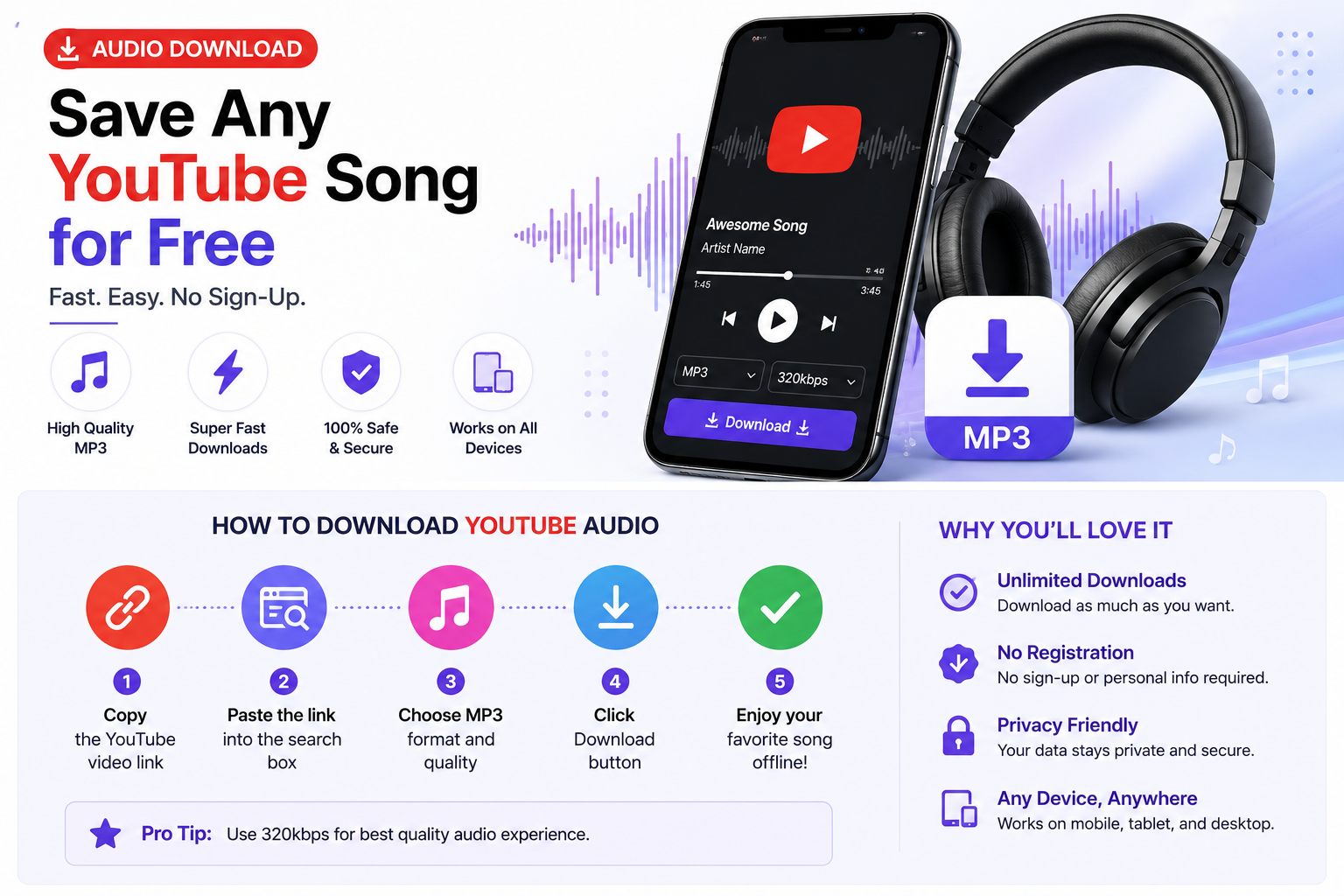
Most people think of YouTube as a video platform, but it is actually the largest collection of free audio in the world. It has:
Full music albums and rare live recordings
Podcast episodes uploaded as video
University lectures and educational content
Audiobooks, guided meditations, and ASMR
DJ sets, radio shows, and music mixes
Speeches, interviews, and documentaries
The problem? You can't just play YouTube offline unless you pay for YouTube Premium. And even then, downloads are locked inside the app.
That's where a free audio downloader like YTClipTune comes in.
How to Do an Audio Download with YTClipTune (Step-by-Step)
It's simpler than you think. No account. No software. Just a browser.
Step 1 — Copy the YouTube link
Go to the YouTube video you want to save. Copy the URL from the address bar. It will look something like: https://www.youtube.com/watch?v=xxxxxxx
Step 2 — Paste it into YTClipTune
Open ytcliptune.com and paste the link into the search or input bar on the homepage.
Step 3 — Choose your format
Select MP3 for music or spoken word content. If you want slightly better quality, choose M4A. Most people pick MP3 because it works on every device.
Step 4 — Click Download
Hit the download button. Within seconds, the audio file will be ready. Click to save it to your phone, tablet, or computer.
That's it. Four steps, zero cost, zero signup.
Audio Download Formats Explained: MP3 vs M4A vs WAV
When you download audio, you'll usually see a few format options. Here's what they mean in plain language:
MP3
The most popular audio format in the world. It works on every device — iPhones, Android phones, old MP3 players, smart TVs, car stereos, you name it. Great for music, podcasts, and general listening. File sizes are small, which means faster downloads and less storage used. For a full walkthrough, check out our YouTube to MP3 converter guide.
M4A (also called AAC)
This is Apple's audio format and it sounds slightly better than MP3 at the same file size. It works perfectly on iPhones and Macs. Most Android phones and Windows computers can also play M4A files without any extra apps.
WAV
This is lossless audio — the raw, uncompressed sound. It sounds perfect but the file sizes are enormous. A single three-minute song in WAV can be 30MB or more. Most regular listeners don't need WAV. It's mainly used by music producers and audio engineers who are working on professional projects.
For everyday use, MP3 is the best choice for audio downloads.
What Audio Bitrate Should You Choose?
Bitrate is how much audio data is packed into one second of sound. Higher bitrate = better quality = larger file.
Here's a simple guide:
Bitrate | Quality | Best For |
|---|---|---|
128 kbps | Good | Podcasts, speech, casual music |
192 kbps | Better | Regular music listening |
256 kbps | High | Quality-focused listeners |
320 kbps | Excellent | Audiophiles, best YouTube source quality |
YouTube's own audio is typically streamed at 128 kbps for most videos and up to 320 kbps for music videos through YouTube Music. YTClipTune extracts at the best bitrate the source video provides, so you always get the highest quality available.
Need a more detailed walkthrough? Our step-by-step guide on how to pull audio from a YouTube video covers every method in depth.
Top 7 Reasons People Use YTClipTune for Free Audio Download
1. It's Completely Free
No subscription. No hidden fees. No "free trial" that becomes paid after a week. YTClipTune is free, full stop.
2. No Software to Install
Everything happens in your browser. You don't need to download an app or a desktop program. This also means it works on Windows, Mac, Linux, Android, and iPhone equally well.
3. No Signup or Account Required
You don't hand over your email address, phone number, or any personal information. Just paste a link and download. That's it.
4. Fast Conversion Speed
The conversion from video to audio happens on the server side. Most downloads are ready in under 30 seconds, even for longer videos.
5. Clean and Safe Downloads
Unlike many sketchy MP3 download websites, YTClipTune doesn't bombard you with fake "download" buttons, pop-up ads, or malware. What you click is what you get.
6. Works on Mobile
You can use YTClipTune directly on your phone browser. No app needed. Find a YouTube video on mobile, copy the link, paste it into YTClipTune, and save the audio straight to your phone's storage.
7. Supports Long Videos
Whether it's a three-minute song or a three-hour audiobook, YTClipTune handles it. There's no artificial time limit cutting off your downloads.
Audio Download Use Cases: Who Uses This and Why
Music Lovers
Some YouTube videos — rare live performances, fan-made mashups, regional artists — simply aren't on Spotify or Apple Music. Audio download is the only way to save them for offline listening.
Students and Learners
University lectures, TED Talks, language learning channels, and tutorial videos all make for great listening material. Downloading just the audio lets students review content while commuting or exercising, without needing to stare at a screen.
Podcast Listeners
Many podcasters upload episodes to YouTube as a video but don't always post to every podcast app. An audio download lets you grab the episode and drop it into any podcast player you prefer.
Content Creators
Creators often need royalty-free background music, sound effects, or ambient audio for their own projects. Downloading audio from copyright-free YouTube channels is a common workflow.
Fitness and Meditation
Guided workouts, yoga sessions, meditation tracks, and breathing exercises are all over YouTube. Download the audio and play it through your earbuds without the phone screen draining battery.
Language Learners
Listening is the fastest path to language fluency. Downloading native-speaker content as audio files means you can listen on repeat, slow down playback, and study anywhere.
Is It Legal to Download Audio from YouTube?
This is a question a lot of people have, and it deserves a straight answer.
YouTube's own terms of service say you should not download content without permission. However, there is an important distinction:
What's generally fine:
Downloading content for your own personal, non-commercial use
Downloading your own content you uploaded
Downloading content the creator has explicitly made available for download
Downloading copyright-free or Creative Commons licensed content
What's not okay:
Downloading copyrighted music to redistribute or sell
Using someone else's audio in your commercial project without a license
Uploading downloaded content to another platform and claiming it as your own
As long as you're using audio downloads for personal listening purposes — like saving a lecture or keeping a copy of a song you love — you're in the same territory as recording a song off the radio, which has been a normal part of music listening for decades.
Always respect the creators whose work you enjoy. If you love an artist, stream them on official platforms too. For legal ways Download Songs From YouTube Legally in 2026
YTClipTune vs Other Audio Download Sites
There are dozens of sites that claim to offer free audio downloads. Here's how YTClipTune stacks up:
No fake download buttons
Many MP3 download sites are filled with disguised ads designed to trick you into clicking something that installs malware. YTClipTune keeps things clean and honest.
No mandatory account creation
Plenty of converters make you sign up just to use them. YTClipTune respects your time and privacy — no account needed.
No file caps on single downloads
Some services limit downloads to videos under 10 minutes or 15 minutes. YTClipTune handles full-length content.
Mobile-friendly design
Most legacy download sites were built for desktop only. YTClipTune works just as well on a phone browser.
No bundled software
Some tools try to sneak browser extensions or additional programs into your device during the download process. YTClipTune is purely web-based — nothing gets installed.
How to Get Better Quality Audio Downloads: 5 Quick Tips
1. Start with a high-quality source video
The audio in your download can only be as good as the audio in the original YouTube video. A 1080p music video will almost always have better audio than a blurry 360p upload.
2. Choose the right format
MP3 for compatibility, M4A for slightly higher quality at the same file size. Avoid WAV unless you genuinely need lossless audio.
3. Pick the highest bitrate available
When you have a choice, always go with the highest bitrate option offered.
4. Download the full video version for music
Music videos on YouTube often have higher-quality audio than the same song on a lyric video or a playlist compilation. Find the official upload if you can.
5. Store downloads sensibly
Create folders organized by genre, artist, or content type. This makes it easy to find your audio files later and keeps your device storage clean.
FAQs
How do I download audio of any song?
Go to YTClipTune.com, paste the YouTube link of the song into the search bar, choose MP3 or M4A format, and hit download — your audio file will be ready in seconds.
What audio formats are best for download?
MP3 is the best choice for most people because it works on every device, while M4A offers slightly better quality if you use Apple devices.
How can I download audio for free?
Simply visit YTClipTune.com — it's 100% free with no account, no signup, and no hidden charges. Just paste a YouTube link and download your audio instantly.
How to find audio downloads?
Search for your song or video on YouTube, copy the video URL, then paste it into YTClipTune.com to find and download the audio in your preferred format.
Where are my audio files saved?
Downloaded audio files are automatically saved to your device's default Downloads folder — on phones, check your Files or My Files app under Downloads.
Where can I retrieve my Downloads?
On a computer, open File Explorer (Windows) or Finder (Mac) and go to the Downloads folder. On mobile, open your Files app and look inside the Downloads section.
The Bottom Line
Downloading audio doesn't have to be complicated, expensive, or risky. YTClipTune gives you everything you need in one clean, free tool — no software to install, no account to create, and no fake download buttons to dodge. Whether you're a student saving lectures for your morning commute, a music lover archiving rare live performances, a podcast listener grabbing episodes your app missed, or a fitness enthusiast building an offline workout playlist, YTClipTune handles it all in seconds. Simply paste your YouTube link, pick your format — MP3 for universal compatibility or M4A for that extra bit of quality — and your audio file is ready to go on any device, anywhere in the world. Stop letting your favorite content stay locked behind a screen and an internet connection — start your free audio download at YTClipTune.com today and take your listening experience wherever life takes you.
Read more: Save Youtube Videos